SMTP Configuration Guide: Sending Emails from Localhost in PHP
Stop struggling with the mail() function. How to configure PHPMailer to send real emails from your local development environment using SMTP.

When you are learning PHP or developing a project locally using WAMP or XAMPP, you may need to send emails from localhost. For example:
- Testing a contact form before going live
- Sending a password reset email in your project
- Sending newsletter test emails to check formatting
By default, PHP mail() does not work on Windows localhost because there is no built-in mail server. We will solve this by using Sendmail and Gmail SMTP step by step.
1. Why Email Does Not Work on Localhost
When you run PHP on your local computer, there is no real mail server to send emails. PHP’s mail() function depends on an external SMTP server (like Gmail) to actually send emails. That’s why we need sendmail.exe, which will:
- Accept emails from PHP
- Connect to Gmail’s SMTP server
- Send emails on your behalf
This setup is very useful for testing before uploading your project to live hosting.
2. Download and Setup Sendmail
We will use a small program called sendmail.exe to forward emails from PHP to Gmail. Follow these steps:
- Create a folder
C:\wamp\sendmail - Download sendmail.zip and extract it
- Copy these 4 files into
C:\wamp\sendmail:- sendmail.exe
- sendmail.ini
- libeay32.dll
- ssleay32.dll
- Open
sendmail.iniand configure it as follows:
smtp_server=smtp.gmail.com
smtp_port=465
smtp_ssl=ssl
default_domain=localhost
error_logfile=error.log
debug_logfile=debug.log
auth_username=your_gmail@gmail.com
auth_password=your_password
pop3_server=
pop3_username=
pop3_password=
force_sender=
force_recipient=
hostname=localhost
Note: Replace your_gmail@gmail.com and your_password with your real Gmail credentials. If you have 2-Step Verification enabled, you need to create an App Password in Gmail for this to work.
3. Configure Gmail Account
By default, Gmail blocks less secure access. You need to enable IMAP:
- Open Gmail in browser
- Go to Settings → Forwarding and POP/IMAP
- Enable IMAP access and save changes

This allows sendmail to connect with Gmail SMTP from your localhost.
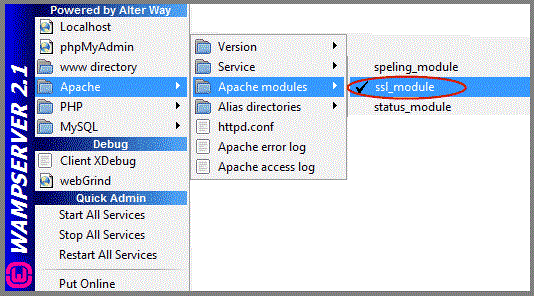
4. Configure WAMP / XAMPP Server
Enable these in your Apache and PHP settings:
- ssl_module in Apache
- php_openssl and php_sockets in PHP extensions

5. Configure php.ini
Now we will tell PHP to use sendmail to send emails:
- Open
php.inifromC:\wamp\bin\apache\Apache{version}\bin\ - Find the
[mail function]section - Update it like this:
[mail function]
; For Win32 only.
; http://php.net/smtp
;SMTP =
; http://php.net/smtp-port
;smtp_port = 25
; For Win32 only.
; http://php.net/sendmail-from
;sendmail_from = you@domain.com
sendmail_path = "C:\wamp\sendmail\sendmail.exe -t -i"
Save the file and restart WAMP/XAMPP.
6. Test Email Sending in PHP
Create a new file sendmail.php in C:\wamp\www (or htdocs in XAMPP) and add:
<?php
$to      = 'recipient@gmail.com';
$subject = 'Localhost Email Test';
$message = 'Hi! This is a test email from localhost using PHP.';
$headers = 'From: sender@gmail.com' . "\r\n" .
           'Reply-To: sender@gmail.com' . "\r\n" .
           'MIME-Version: 1.0' . "\r\n" .
           'Content-type: text/html; charset=iso-8859-1' . "\r\n" .
           'X-Mailer: PHP/' . phpversion();

if(mail($to, $subject, $message, $headers)){
  echo "Email sent successfully!";
}else{
  echo "Email sending failed.";
}
?>
Open http://localhost/sendmail.php in your browser. If everything is correct, you will see Email sent successfully! and the email in your Gmail inbox.
For better debugging during email testing, read our error reporting guide.
7. Real-World Use Cases
- Contact Forms: Test form submissions locally before deploying
- Password Reset: Validate email flow for user account recovery
- Newsletter Testing: Check HTML email formatting before sending to real users
Example: You can create a small contact form that triggers PHP mail() to send messages to your Gmail.
8. Common Issues and Troubleshooting
- If email says “sent” but not delivered:
- Check
error.loganddebug.loginsendmailfolder - Disable 2-step verification or use Gmail App Password
- Check
- Windows 8/10 issue: Change in
sendmail.ini:smtp_ssl=none - Make sure
sendmail.exepath has no spaces
9. Bonus: Using PHPMailer (Optional)
While PHP mail() works for simple emails, PHPMailer is a better option because it:
- Supports attachments and HTML emails easily
- Handles SMTP authentication securely
- Gives better error messages
Install with Composer:
composer require phpmailer/phpmailer
PHPMailer will work with the same Gmail SMTP setup but with more flexibility.
Conclusion
You have successfully configured your local WAMP/XAMPP server to send emails with PHP using Gmail SMTP. This is very useful for testing forms, newsletters, and email notifications before going live. Remember to switch to a professional SMTP or PHPMailer for production for better security and reliability.

Ketan Patel
PHP & MySQL Performance Optimization Specialist
I specialize in diagnosing and fixing slow PHP applications, optimizing MySQL queries, and resolving backend bottlenecks in live production systems. My approach is metric-driven — identifying root causes through profiling, execution analysis, and structured optimization instead of guesswork.