PHP $_GET vs $_POST Differences
It’s more than just "security." Understand the idempotency of GET vs POST and which one to use for search, filters, and data updates.
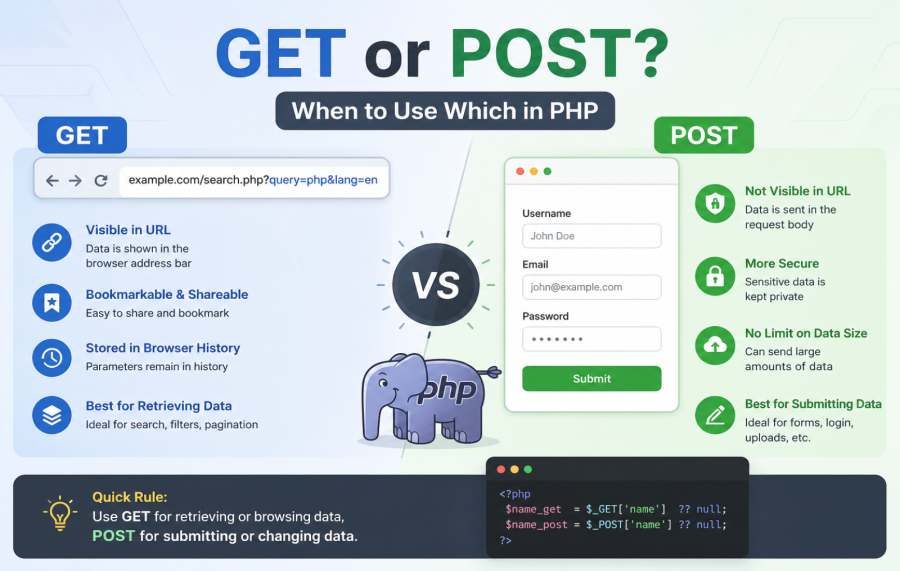
If you work with PHP forms or APIs, you will often see two terms: $_GET and $_POST. Almost every PHP developer learns these in the beginning.
But in real projects, many developers still get confused about when to use $_GET and when to use $_POST.
For example:
- Why is form data visible in the URL sometimes?
- Why does a form fail when sending large data?
- Why does login form usually use POST?
- Why do filters and search forms use GET?
If you have ever asked these questions, this guide will help you.
In this article, we will understand:
- What $_GET and $_POST are
- The key difference between them
- Real-world use cases
- Common mistakes developers make
- Security best practices
This explanation is written in very simple language so both beginners and experienced developers can quickly understand the concept.
What is $_GET in PHP?
$_GET is a PHP superglobal variable used to collect data sent through the URL.
The data is appended to the URL using a query string.
Example URL:
https://example.com/product.php?id=10
In this example:
- id is the parameter name
- 10 is the value
You can access this value in PHP like this:
$product_id = $_GET['id'];
echo $product_id;
The output will be:
10
This method is commonly used for:
- Search filters
- Pagination
- Sorting results
- Tracking parameters
What is $_POST in PHP?
$_POST is used to collect data sent through an HTTP POST request.
Unlike GET, the data is not visible in the URL. It is sent in the body of the request.
Example HTML form:
<form method="POST" action="login.php">
<input type="text" name="email">
<input type="password" name="password">
<button type="submit">Login</button>
</form>
In PHP you can access it like this:
$email = $_POST['email'];
$password = $_POST['password'];
POST is commonly used for:
- Login forms
- User registration
- File uploads
- Saving data in database
Main Difference Between $_GET and $_POST
| Feature | $_GET | $_POST |
|---|---|---|
| Data location | URL query string | Request body |
| Data visibility | Visible in browser URL | Not visible |
| Data length | Limited | Large data allowed |
| Use case | Fetching data | Sending data |
| Bookmark support | Yes | No |
| Security | Less secure | More secure |
This table explains the difference in a simple way.
Real World Example (Very Common Scenario)
Let’s take a real example of an eCommerce website.
Example 1: Product Filter
When a user filters products by category or price:
example.com/products?category=mobile&price=20000
This is perfect for $_GET because:
- User can bookmark the page
- URL can be shared
- Search engines can index it
Example 2: Login Form
When user logs in:
email
password
This should always use $_POST because:
- Credentials should not appear in URL
- More secure
- Cleaner request
This is the reason why most authentication systems use POST.
Common Mistakes Developers Make
1. Sending Sensitive Data Using GET
Some beginners send passwords using GET like this:
login.php?email=test@gmail.com&password=123456
This is a bad practice because:
- Password appears in browser history
- Server logs store it
- Anyone can see it
Always use POST for sensitive data.
2. Using POST for Simple Filters
Many developers use POST for search filters.
This is not ideal because:
- URL cannot be shared
- User cannot bookmark result
- SEO value is lost
Filters should normally use GET.
3. Not Validating Input Data
Never trust user input.
Always validate data before using it in database queries.
If you are working with database queries, you may also like this guide:
Security Best Practices When Using $_GET and $_POST
Security is very important when handling form data.
1. Always Sanitize User Input
$name = htmlspecialchars($_POST['name']);
2. Validate Required Fields
if(empty($_POST['email'])){
echo "Email is required";
}
3. Use Prepared Statements
This helps prevent SQL injection attacks.
Pro Tip From Real Development Experience
In many large projects, developers use a combination of GET and POST.
Example:
- Page filters → GET
- Form submission → POST
- API requests → Both depending on purpose
Think of it like this simple rule:
If the request only fetches data → use GET
If the request changes or saves data → use POST
This rule works in most real-world systems.
Final Thoughts
Understanding the difference between $_GET and $_POST is very important for every PHP developer.
Both are simple but powerful tools for handling user input.
Let’s quickly recap:
- GET → Used for retrieving data
- POST → Used for sending data
- GET → Visible in URL
- POST → Hidden in request body
- GET → Good for filters and search
- POST → Best for forms and sensitive data
When used correctly, they help you build clean, secure, and user-friendly applications.
If you are learning PHP or building real projects, mastering these basics will make your development life much easier.

Ketan Patel
PHP & MySQL Performance Optimization Specialist
I specialize in diagnosing and fixing slow PHP applications, optimizing MySQL queries, and resolving backend bottlenecks in live production systems. My approach is metric-driven — identifying root causes through profiling, execution analysis, and structured optimization instead of guesswork.